

News and Ideas for the 21st Century Musician
Showing posts with label #CHROME. Show all posts
Showing posts with label #CHROME. Show all posts
Friday, July 10, 2015

Thursday, July 9, 2015
MIDI Tutorial: Creating Browser-Based Audio Applications Controlled by MIDI Hardware

While the Web Audio API is increasing in popularity, especially among HTML5 game developers, the Web MIDI API is still little known among frontend developers. A big part of this probably has to do with its current lack of support and accessible documentation; the Web MIDI API is currently only supported in Google Chrome, granted that you enable a special flag for it. Browser manufacturers currently put little emphasis on this API, as it is planned to be part of ES7 standard.
Designed in the early 80’s by several music industry representatives, MIDI (short for Musical Instrument Digital Interface), is a standard communication protocol for electronic music devices. Even though other protocols, such as OSC, have been developed since then; thirty years later, MIDI is still the de-facto communication protocol for audio hardware manufacturers. You will be hard-pressed to find a modern music producer that does not own at least one MIDI device in his studio.
With the fast development and adoption of the Web Audio API, we can now start building browser-based applications that bridge the gap between the cloud and the physical world. Not only does the Web MIDI API allows us to build synthesizers and audio effects, but we can even start building browser-based DAW (Digital Audio Workstation) similar in feature and performance to their current flash-based counterparts (check out Audiotool, for example).
In this MIDI tutorial, I will guide you through the basics of the Web MIDI API, and we will build a simple monosynth that you will be able to play with your favorite MIDI device. The full source code is available here, and you can test the live demodirectly. If you do not own a MIDI device, you can still follow this tutorial by checking out the ‘keyboard’ branch of the GitHub repository, which enables basic support for your computer keyboard, so you can play notes and change octaves. This is also the version that is available as the live demo. However, due to limitations of the computer hardware, velocity and detune are both disabled whenever you use your computer keyboard to control the synthesizer. Please refer to the readme file on GitHub to read about the key/note mapping.

Prerequisites
You will need the following to for this MIDI tutorial:
- Google Chrome (version 38 or above) with the
#enable-web-midiflag enabled - (Optionally) A MIDI device, that can trigger notes, connected to your computer
We will also be using Angular.js to bring a bit of structure to our application; therefore, basic knowledge of the framework is a prerequisite.
Getting Started
We will modularize our MIDI application from the ground up by separating it into 3 modules:
- WebMIDI: handling the various MIDI devices connected to your computer
- WebAudio: providing the audio source for our synth
- WebSynth: connecting the web interface to the audio engine
An
App module will handle the user interaction with the web user interface. Our application structure could look a bit like this:|- app
|-- js
|--- midi.js
|--- audio.js
|--- synth.js
|--- app.js
|- index.html
You should also install the following libraries to help you build up your application:Angular.js, Bootstrap, and jQuery. Probably the easiest way to install these is viaBower.
YAMAHA REFEACE SYNtH LINE
YAMAHA REFACE SYNH LINE
http://goo.gl/lEZbsS
http://goo.gl/lEZbsS


+
soundmondo title
Create your Soundmondo inspire and be inspired


Coming on Septem
ber 1sthttp://goo.gl/lEZbsS
Thursday, July 2, 2015
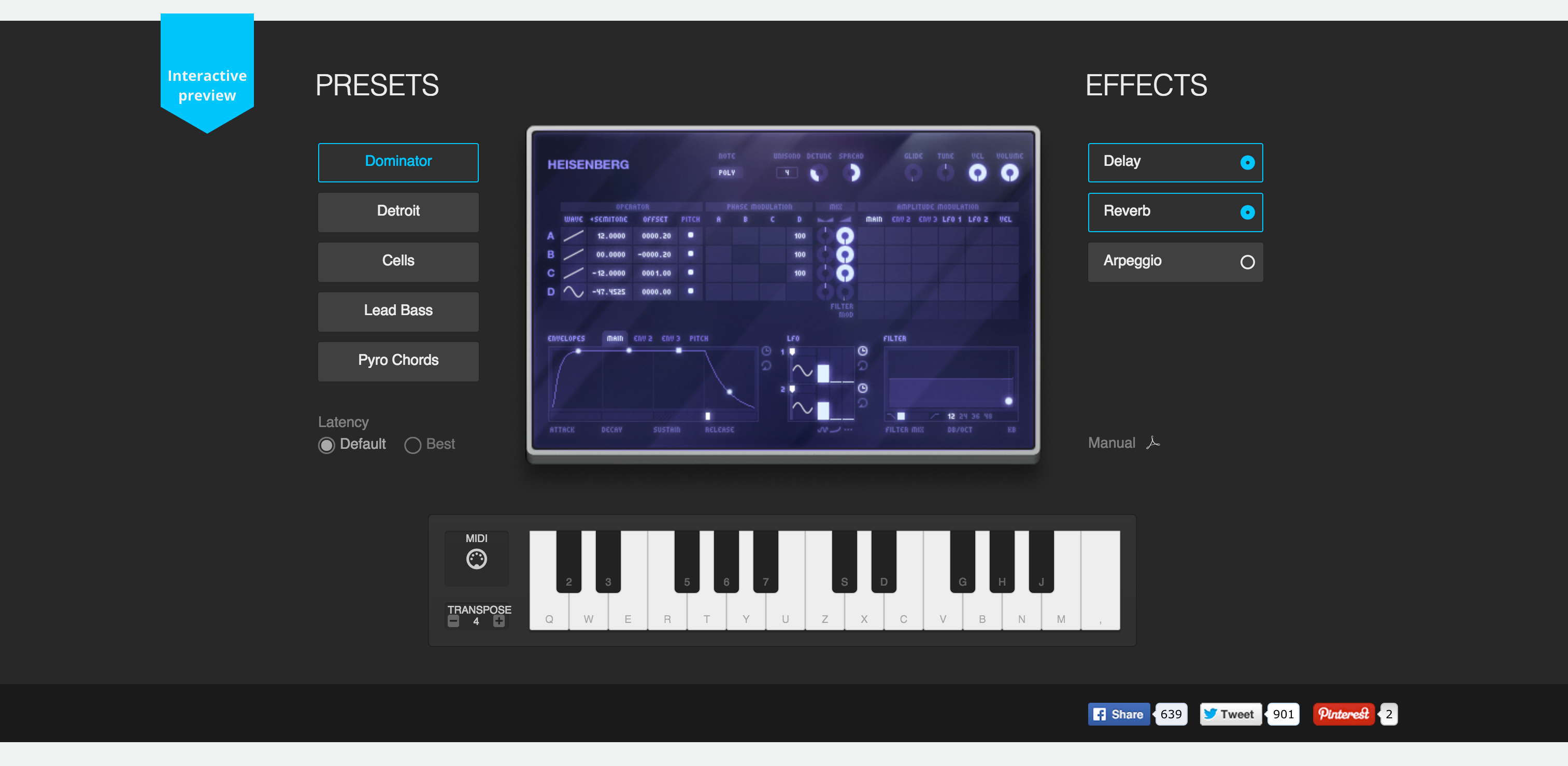
Meet the AUDIO TOOLS HEISENBERG
Suport for MIDI in Chrome has filly arrived and the first complete but young application can be found in Audio Tools HEISENBERG APP.


- See more at: http://www.audiotool.com/product/device/heisenberg/#sthash.LREaJyFH.dpuf
MEET THE HEISENBERG
This is an interactive preview of our Heisenberg synthesizer.
Running natively in HTML5
The new online version of Audiotool will be completely driven by HTML5 and WebAudio
Play it with your Computer Keyboard
Use your Computer Keyboard and also play with the Visual Keyboard
Use your external Midi Keyboard
Make sure you are viewing this website with Google Chrome to use your MIDI keyboard. Learn more
Interactive
preview
preview
822 1085 7
CORE FEATURES
The Heisenberg is audiotool's sonic wishing well. With its 4 OSCs and its massive Filter section this PM synthesizer can deliver everything from deep bass to high pitched whistlesounds. Use its LFOs capabilities to be synced via note values and you will even get this rhythmic background pattern you have been searching for all the time.
USER DRIVEN CONTENT
Since all Audiotool devices have access to the cloud based Audiotool preset library, users can save their device setting as a preset to share it with the community. This ensures an ever growing preset library with over 19000 presets for the Heisenberg by now.
Google Chrome gains MIDI support !
30 years after its creation, MIDI gets a modern makeover.

The humble Musical Instrument Digital Interface (MIDI) protocol—which allows a wide range of musical hardware and software like synths and digital audio workstations (DAW) to communicate with each other—is over 30 years old at this point. Due to widespread support, though, it remains the primary connection protocol in the audio production world. Now, thanks to Google, built-in MIDI support is available in the Web browser, opening up a raft of creative possibilities.
Google's Chrome browser (from version 43) includes integrated MIDI hardware support, which previously required installing specialised software like the Web MIDI API. Websites that make use of Chrome's MIDI support are able to communicate directly with connected MIDI devices such as drum machines and keyboards, allowing users to control things like Web-based synthesizers with a preferred MIDI instrument.
Since MIDI support was rolled out to the Chrome beta channel in April, a number of different Web-based synths and DAWs created in HTML5 and other languages have popped up, showcasing some of the different musical possibilities for the technology. While the current crop of software can't yet compete on latency with dedicated software, and there are some audio quality hiccups here and there, it's impressive to see what can be done with a browser and HTML5.
One of the most impressive example is Heisenberg, an HTML5 synthesizer that makes use of the WebAudio API and Chrome's built-in MIDI support. While it's more of a teaser than a fully featured synth at this point, Heisenberg does let you toy around with its five presets, changing the waveforms and envelope filters, as well as letting you add delay and reverb or arpeggiation. Heisenberg is made by the developer Audiotool, which also makes an impressive full-on internet-based DAW in Flash. The developer is working to move the DAW over to HTML5, but you can check out the Flash version for free in the interim.
Those who can't wait for Audiotool can check out app.hya.io, a modular DAW built entirely in HTML5, with support for MIDI having just been added. While the interface is a little, er, functionalcompared to Audiotool's, it's quite a powerful DAW. You can add all sorts of different instruments and FX, sequencing them up to create some pretty sweet sounding loops. There's also support for direct audio input, so you can add vocals and the like to your tracks.
Over at websynths.com, there's a great microtonal synth that lets you tweak the pitch shift of each individual oscillator to create some really interesting sounds. There are also a bunch of effects likes compression, delay, and distortion that you can add, as well the ability to share patches (ready-to-use synth settings) over the Web. A similarly interesting synth is available over at Synthy.io. The three-oscillator synth not only contains a built-in sequencer, but there's also a live mode that matches different sounds to trippy bars of colour.
Subscribe to:
Posts (Atom)